

Changelog Nov 11, 2026 - Custom indicators, and support tickets in your account
Write your own indicator in a short script, then scan, chart and set alerts with it on Super and Super Pro. Plus support tickets in your account and a new name for the top API plan.
 Eoin3 min read
You can now write your own indicator in scanr.ai, then scan the market with it, chart it and set alerts on it, the same way you use RSI or a moving average. Custom indicators come with Super and Super Pro, on the web. This release also lets you open support tickets from your account.
Custom indicators
Open Custom Indicators in the sidebar. The editor takes a short script in
a language thinkorswim users will recognize: input, def, plot and
if … then … else. It checks the script as you type, underlines each
problem, and previews the result on a daily chart of any ticker.
# How far the close sits from its average, in ATRs.
input length = 20 (2..100);

def avg = Average(close, length);
def atr = ATR(high, low, close, length);

plot Stretch = if atr > 0 then (close - avg) / atr else 0;
The script from the video measures how far a stock's close has run from its
20-day average, counted in typical daily ranges. Save it, then add it to a
scan: click + on a filter group, pick Custom indicator, and set a
condition such as Stretch greater than 2. The scan covers the whole market.
Your results get a column with each stock's latest value, and you can sort by
it. Save the scan with an alert, and scanr.ai tells you when new stocks
match. To draw it on a chart, open chart settings and click Add a custom
indicator.
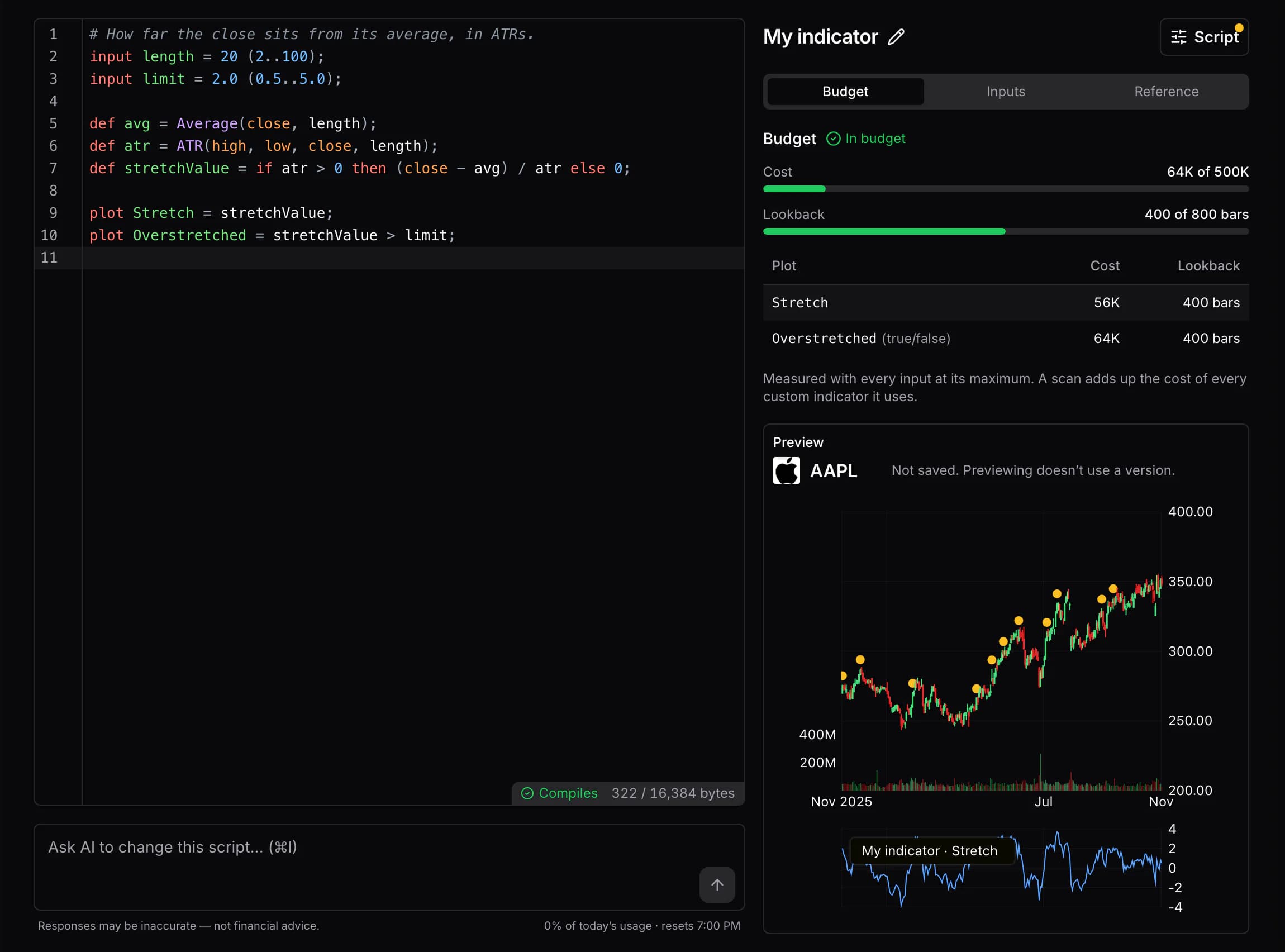
You don't have to start from a blank page. Type a request in Ask AI to change this script under the editor, and the AI answers with a diff that shows whether the new version compiles. Apply it or discard it. In the AI terminal, describe the indicator you want and open the draft in the editor. The Official tab holds 15 scripts to use as they are or copy and change. Five teach the language, from RELVOL to Squeeze. The other ten scan for named setups such as Channel Breakout, RSI Pullback and Fair Value Gap.
Super keeps 25 scripts and runs up to 3 custom indicators in a scan. Super Pro keeps 100 and runs up to 5. Your scripts are private, so someone you share a scan with can't run yours. You write and edit scripts on the web. The custom indicators guide walks through a first script, and the language reference covers every statement and limit.
Support from your account
Support now has its own page under your account. Open a ticket with New ticket, pick a topic, and follow it from Received to Resolved. We reply on the page and by email. Our support address is now [email protected].
The page also shows the support your plan includes. On the API Power User and Ultimate plans, you can request an invite to a shared Slack channel with the scanr.ai team. API Ultimate includes a one-on-one onboarding call with Eoin, our founder.
Also in this release
- The top API plan is now called Ultimate. Its limits, data and price stay the same, and your tokens keep working.
- Over the API,
cache_ttl_secondson a scan now depends on your API plan. Starter always uses 120 seconds, Power User can set 30 to 900, and Ultimate 0 to 900. Each scan response reports the cache settings it used. The API has its own changelog now, with every change to what it accepts or returns. - The correlated peers on a ticker page show company logos.
- Chart panels for market regime, relative strength, short interest, short volume, insider trades and fundamentals drew each reading one session early. Each reading now sits on its own day.
- The roadmap cards we carried over from the old feedback board now count their author's vote.
- If you subscribe to the API alone, you no longer get emails meant for the Free plan.
Tell us what you build with custom indicators, or anything you run into, on the feedback board or at [email protected].
— Eoin & The Scanr.ai team